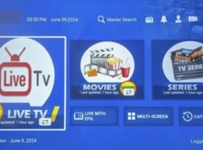
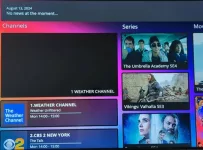
If you are searching for a reliable SO Player subscription from an official SO Player IPTV service, you’re in the right place. Whether you are an existing user needing help with pricing, how to pay your bill, renewal, or searching for a SO Player free trial, this guide indeed has you covered. Also, read our SO Player app download and setup guide.
SO Player (also written as SOPlayer) was a popular IPTV app that lost some of its fame in 2025, when removed from the official app stores. Still, it can be installed on some compatible device, just not as many as before. The media player works in conjunction with the IPTV subscription-based service that you will have access to later.
Keep in mind that the app doesn’t include live channels and VOD once installed. In this walkthrough, we will cover how billing and renewals work, as well as what you can do if you lose access or can’t find your way back to the IPTV service website that has your account.
UPDATE:
SO Player IPTV services removed. We recommend Nora Go and XPlay IPTV services, which are great alternatives. You get the same everything including the same streaming TV/VOD content. When clicking the link below, you will be taken to the NoraGo/XPlayer IPTV service website.
Quick Steps: How to Subscribe…
- Visit the Subscription Website ***Now Nora GO App IPTV Service and better
- Choose Your Plan: Only the monthly plan/price available, no automatic billing
- Register for Free Trial: A 3-day trial is available for testing
- Create Your Account: Provide personal details
- Payment Options: Accepts credit/debit cards
- Activation-Login Credentials: Includes ProviderID, Username/Password, plus 4 Device PIN Codes
How the SO Player Subscription Works
The subscription process is straightforward, and there’s only one subscription package for the IPTV service that we are recommending. You simply register on the website to create your account, and not inside SOPlayer. Once you enter all your details and make the payment, expect to receive a number of emails from the provider immediately.
Be sure to check your Spam or Junk mail folder if you don’t see any emails. Any emails you find from the IPTV provider, move them into your regular email inbox. Always get in the habit of checking your email, including the Spam or Junk mail folder. You will receive the activation/login credentials on the last web page after you make the payment and/or in the email sent to you.
Also, you can log into the ‘My Account’ area on the IPTV service website using the email address that you registered with and the password you created.
🎥 Video Tutorial of Subscription & Free Trial:
Watch the video below to see the entire process, including the SO Player free trial…
Recommended SO Player Subscription Service
NOTE: Now Nora Go IPTV Service Subscription
What You’re Paying For (And What You’re Not)
You are paying for a month’s worth of watching live channels and VOD movies/TV series. While the app gives you access, the IPTV provider gives you the streaming content as follows:
Included:
- Adult 18+ ***Can use Parental Control to block
- 4,500 live TV channels (premium, US local/regional, US, CA, UK, French, Spanish, etc.)
- Live sports, news, shows, movies, kids’ shows, etc.
- UFC & NFL Replays ***maybe included
- 10s or 1000s VOD movies (plus new movie releases) & TV series (seasons/episodes)
- 4 device connections at one time
- Activate/use TV player app (SO Player)
- EPG (Electronic Program Guide / TV Guide)
- Free Trial ***no credit needed
- Chat box support
- And more
Not Included:
- Bundle
- Hidden/late/cancellation fees
- Automatic billing (manual one-time payment only)
- Phone or in-home support
NOTE: No antenna, receiver, set-top box, or any hardware required. Just the media player and subscription or free trial.
Fake Subscription-Based SO Player Websites
During 2025, the SOPlay app was removed from the Google Play Store and Apple App Store, which kept users from downloading the media player to their devices. As a result, some IPTV merchants named their website after the SO Player brand name, which doesn’t appear to be a trademark. What these merchants are doing is targeting Google searchers looking to find a subscription for the app.
They have you thinking one way and try to trick you or hope you are willing to download and install a different kind of app. When visiting one of those websites, they are not for the SO Player. They are only using the name to get you to come. We provide you with the official SOPlayer websites that actually support the application.
Websites to Stay Away From When Seeing…
- Apps supported, not named SO Player
- Tutorials/Setup Installation Section not providing the SOPlay URL or APK URL
SO Player Subscription Price and Plans
Subscription price and plans can vary slightly with each SOPlayer IPTV service. There can be one-month plans only or 2 or more months included for the other plans. Again, it depends on where you go.
There is only one subscription plan that includes 4 device connections from the recommended subscription-based TV/VOD service.
How Much Does a SO Player Subscription Cost?
For our recommended subscription-based provider…
One-Month Subscription: $25.00
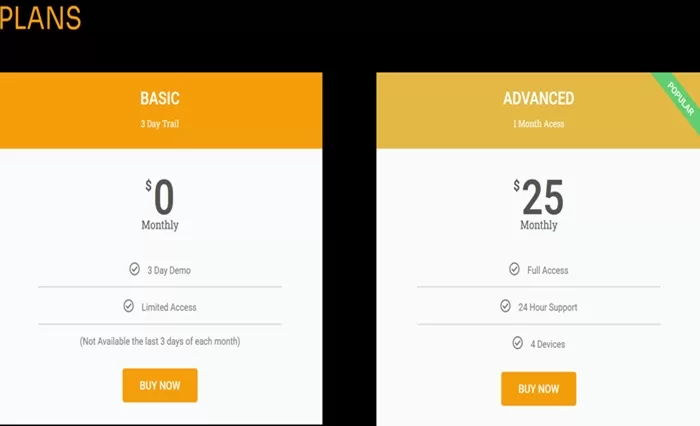
View SOPlayer subscription pricing and renewal options
NOTE: Now NoraGo IPTV service
Monthly vs Long-Term Subscription Options
There is only one payment option, and that’s the one-month plan, which allows you to pay as you go. Meaning, you have full control over when or when not to pay. The recommended service that we are providing (see links) doesn’t have 2 or more months, so there is nothing to explain regarding long-term plans.
If the 3-month or 6-month plan was included, we would tell newcomers enter into the trial to test. Then buy a one-month plan to test the service further before subscribing to a long-term plan.
Common Subscription Issues
Didn’t Receive Login Details: The IPTV service usually sends the app login details immediately after payment. Or, there can be a slight delay when verifying the payment and creating the account. If the user doesn’t get the emails, it’s probably because they went into the Spam or Junk mail folder. The user needs to move those emails into his/her regular email inbox. Must also make sure the email address is correct
Subscription Expired: If there is no more service, it may be that the subscription reached the end of the billing cycle and needs to be renewed. The user needs to revisit the subscription account website.
Provider ID Not Working: More than likely, the user entered the wrong ID number and needs to go back to the IPTV provider’s website and contact support.
Payment not applied: Payment was not approved. Could be that the user’s bank declined it, and if that’s the case, the user must contact his/her bank to allow payment. Entered the wrong credit/debit information, zip code, or expired card.
SO Player Account Renewal Explained
There is no automatic billing or rebilling, only manual (one-time) payment. When a subscription comes to the end of the billing cycle (one-month), the service will end, and no further content delivery will occur. The user can simply walk away with no need to cancel the subscription.
The user can decide later, such as one week, one month, or one year, to pay and use the service again. Having access to the account renewal is endless. Simply return to the official SO Player subscription service website.
➡️How to Renew Your SO Player Subscription Online
The SO Player subscription renewal process is easy to do. Payments cannot be made through the SOPlayer application, so you must return to the IPTV service or TV/VOD service website.
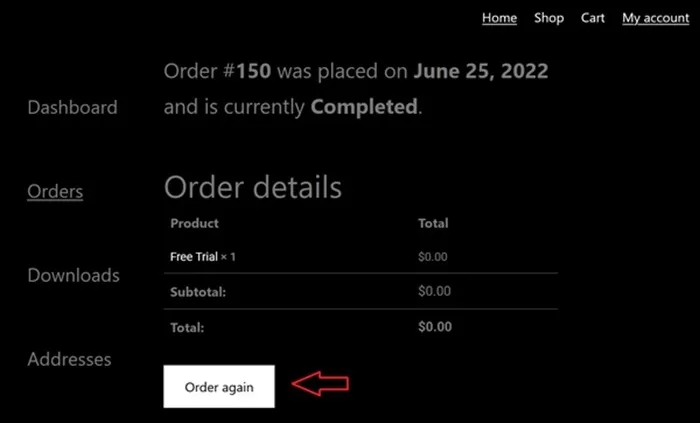
There are two options to complete and pay to renew:
- Log in to the website via ‘My Account’ with your username (email address) and password. Click/Select the ‘Order Again button or the Shop link in the menu section at the top. Or…
- Don’t log in to ‘My Account. Click the ‘Buy Now’ button on the website’s Home page. Go through the registration process and log in to your account. Then make the payment
NOTE: Each time to renew the subscription, use one of the options above. You renew the service when the subscription service has ended, and not before.
Common Renewal Errors
- Looking to Renew Inside SO Player: Searching for the subscription button in the app, and can’t find one. The reason for that is that there’s no way to pay inside the app
- Invalid Username or Password: Login credentials don’t work anymore, which could occur when the subscription expired before renewal, a credential mistype, or when renewed at the wrong subscription-based website
- Can’t find “Pay My Bill” Page: Users often use that term to try to find where to go, and don’t remember the name of the IPTV service to find it. Can’t find the emails sent by the subscription service, and didn’t bookmark the website to find them again
Mony-Back Guarantee (Refund)
Many IPTV merchants have a Refund Policy section on their website to read. However, if you don’t see one, feel free to contact them to get a clear understanding. There may be more or fewer conditions involved. The money-back guarantee will state the number of days after payment when a refund can be requested. But again, if you don’t see a policy, ask them before buying the subscription.
Is There a Free Trial?
There is a free trial, and generally, that’s the case with the remaining SO Player subscription services out there. Note, we said remaining. The SO Player isn’t as popular as it once was due to it no longer being in the official app stores to download. But it can still be downloaded to some devices.
Free Trial: $0.00 ***No credit card required.
The same way you would register for the subscription, you would for the trial, only you don’t make a payment.
What “Free Trial” Really Means with IPTV Apps
The SO Player media player is free to download for all individuals across the globe. It does not come with a free trial or subscription to use and watch TV online. The free trial and subscription come from the official SO Player subscription website.
Some IPTV apps do come with a free trial that allows testing the app for 7 days, for instance. Then, when the trial ends, you must buy the subscription to continue using the app. Still, the streaming content comes from the IPTV provider, and never the app.
How to Pay Your SO Player Bill
New Subscribers:
It’s very important to keep yourself well-organized. When receiving all the emails after registering for the free trial or subscription, create an email folder and put the IPTV subscription service emails in it. Save that folder somewhere so you can find it later. You should also bookmark the website to have another way of finding them.
Accepted payment methods include major credit/debit cards, and may include other payment methods depending on what payment process the subscription service is using.
Current Subscribers:
If searching for SOPlayer Pay My Bill, things become tough if you don’t remember the SO Player subscription website. Some users don’t organize themselves by bookmarking the website and creating a folder named after the service brand name, such as Rockspheres, to put all emails in it. When finding yourself in this predicament, you can try doing the following in your email account:
- Spam/Junk Mail Folder: If you never received any emails from the SOPlayer subscription service, check your Spam or Junk mail folder. If you find any of their emails, move them into your regular email inbox
- Sent Section: Go to your email account and go to the Sent section in the left column. This generally has emails that you either sent out or received. Try to find the subscription service email
- History Section: Go to the ‘show all history’ section and try to find the URL of the subscription website
If none of the above helps, then it’s time to start over. There’s no sense in wasting time going to other websites to ask for help. They can’t. No one knows where you paid your money or where your account is located. At this stage, your choices are either to subscribe to another SO Player subscription service or one of the alternative subscription services below.
How to Cancel Your Subscription
Because there is no autopay (automatic billing), it’s very easy to cancel. Actually, you don’t need to do anything to cancel; just don’t revisit the SOPlayer subscription website to renew SO Player. The IPTV or TV/VOD service cannot charge you again, and they won’t try.
We didn’t see a way to cancel or delete the account, so if this is something you wish to do, contact support via the chat box.
Getting Subscription Help from JustAnswers
Some newcomers and inexperienced SO Player subscribers go to the JustAnswers website to get subscription, renewal, and other related help. I don’t know why. They should be going directly to the SO Player service website, where they have an account to get help.
You are better off coming to this website (InternetTvDotCom) to get insiders’ help from those who actually used and tested the app and subscribed to the subscription service. We test and review IPTV services and TV apps. JustAnswers is said to have experts in many fields to serve individuals who need help. But they don’t have the hands-on experience or knowledge of what is being explained here.
JustAnswers is a subscription-based service. You don’t need to waste anymore of your hard-earned money. The Rochspheres service we are recommending is where you would return when help is needed, not some other place.
Alternative Apps & IPTVs: XPlay and Nora GO Subscription-Based IPTVs
The following applications and services are very similar and require similar activation/login credentials. Because SO Player was removed from the official app stores, you can’t download it to any iOS/Apple devices. It must be sideloaded to Android-based devices now, which includes the Fire TV Stick and related devices.
- Tesla (XPlay & Nora Go) | Video Review
- Cloud Horizon NoraGo & Xplay | Review
- TotalGO (NoraGO) | Review | Video
NOTE: XPlay and Nora are compatible with the same devices as SO Player, but these apps can also be installed on iOS and Android-based devices, smart TVs, NoraGo for computers, XPlay for Roku, etc.

❓ FAQ – SO Player Subscription
Q: Is SO Player subscription-based?
A: Indeed, it is, but must be paid through the website and not the TV app
Q: What is SO Player’s Free Trial?
A: It’s a 3-day free trial with no credit/debit card needed upfront
Q: Can I Use SO Player Without an IPTV Service?
A: SOPlayer is not a standalone application that comes with its own live channels and VOD movies/TV series
Q: How much does SO Player cost?
A: Depending on the IPTV service website that supports this app, the price usually starts at or around $25.00 of one month
Q: Can I renew my SO Player account online?
A: Yes, you must return to the website that has your subscription account to renew
Q: Where do I pay my SO Player bill?
A: Always return to the SO Player official website that has your account. If you can’t find your way back there, then any official SOPlayer website will do. As for the latter, you will need to start over and subscribe. Then you can go back there to renew
Final Thoughts
By now, you should know that the SO Player subscription will work only when connected to the IPTV servers of the service. It’s very important to know how free trials, subscriptions, billing, renewals, and pricing work to avoid misunderstandings and being frustrated down the road.
The guide covered everything from registering for the SO Player free trial to subscription, from choosing the subscription plan to renewing your service plan, and also ways to resolve a common issue, such as searching for “SO Player pay my bill.”
If new to these subscription-based services, it’s always best to enter into the trial to test before making a purchase. For issues that can arise, it’s best to revisit the service website that has your account to get support. Since SO Player cannot be downloaded to iOS/Apple or Roku devices, we also provide some very similar alternatives.