Best Low-Cost Video Recording Software with Pre-Scheduling and Other Great Features
New!… Replay Video Capture 10 is Now Here (video recorder review).

Replay Video Capture Review by Real User and Tester. People who watch TV shows online come to realize one thing. There is no way to record. This might not be an issue for some individuals. However, you may want to record what’s playing on computers. This means live and/or on-demand streams. This can come from recording a web browser or DVD. What makes this a reality is DVR technology that records anything, anywhere.
*********************************************************
ATTENTION MAC USERS:
RVC for Mac Computers Has Arrived. This video capture software review did not cover the Mac version. To find out more, Click Here. This will take you to the official Applian website. When you get there, go to the “Downloads” category and select ‘Mac Downloads’
Where to Download & Install the Replay Capture Suite for Windows & Mac – Click Here
Record and Convert ANY Web Video or Audio – Also See FREE Trial
(Includes: Replay Media Catcher, Replay Video Capture, Replay Music, Replay Radio (one-year subscription), Replay Converter, Replay Media Splitter, Video Padlock.)
Click Here to Download Free Applian Director (Scroll down page to find it). Also included in Replay Capture Suite
*********************************************************
Review Continues…
The best work-a-round one might consider to break the unable-to-record issue is replay software like Video Capture by Applian Technologies. This company has been around for years and offers plenty of support that also includes a forum. They offer a line of related products that are designed to get around media issues and at the same time manipulate all kinds of video and audio content for users.
UPDATE – Replay Video Capture 10.3.4.0:
10/2/2021
Now allow you to make pristine copies of the original audio files. No lagging or delays between your microphone or speaker, just clear, crisp audio every time you hit play.
Keen to use your new MP3 Bluetooth player? This latest update makes it possible for you to instantly transfer your recordings to multiple audio devices, including your shiny new Bluetooth player. Don’t let wire cables tie you down, enjoy music anywhere with the new release.
Applian Replay Video Capture – How Does It Work and Is It Legal
Applian Replay Video Capture software (RVC) makes use of sophisticated technology that lets the user operate it to capture any video or live streaming content (coming from any source). Compatibility: RVC Windows 10, 8, 7, Vista, or XP operating system – may it be an offline or online source – the replay software can record video in high quality. That said, Applian Technologies claim if you can watch it, then you can record it!
Subsequently the content can be recorded from any website. Once again, you can record from any website regardless of the format used. This tool can also record DVD’s when playing on a PC. If worried about legal issues, Applian Technologies RVC claims there is nothing to fear; the software doesn’t circumvent Digital Rights Management, a.k.a. DRM, or any copyright protection, thus re-affirming their Video Capture software is perfectly safe (100%) worldwide.
Watch Video – See it in Action
Just watch the videos below for an introduction to Replay Video Capture 10 and see how to use the new Background Mode feature inside this tool as well…
Watch the Replay Video Capture 10 Video Below…
Watch More Videos Here
FREE Trial Download May Not Last Forever – Get It Now Before It’s Gone
If you’re looking for a way to produce quality video recordings from sources that don’t offer a record feature, video replay capture eliminates a common barrier that one faces in these matters. It gives users the ability to record any content online. The user can choose to save some or part of a DVD recording or produce high quality movies from anywhere on his/her computer screen.
What’s new in the Replay Video Capture 8 version that wasn’t available in previous versions is the ‘Background Mode’ that records from hidden windows. This means the user can either hide or cover the video with another window or browser and Replay Capture will continue to capture the content as it plays without any interruptions during the recording – You even record when the video plays in full screen.
See last update for Replay Video Capture 10 at top.
Comparing the Finer Points & Benefit
Compare to other screen capture software out there, RVC produces high quality video output. It has the ability to record up to 50 frames per second which is something that should be compared to other brands on the market. The free brands don’t offer the technology needed to create high-quality videos coming from any and all sources.
Some of the RVC Video Benefits Include:
- Capable of recording any video website, using any streaming protocol
- Capable of recording any live streaming content such as sports
- New Background mode – Records even if RVC is hidden behind windows/browsers
- Great for video chat sites, webinars, webcams, PowerPoint presentations, etc.
- Skype video call recordings
- Record DVDs (offline)
- Very high video quality
- Can run from Thumb drives and USB
- Supports dual monitor setups
- Watch recorded videos from Applian replay video app on HDTV when connecting computer
Futhermore…
I found using the replay video app to record works really well. This includes recording videos from websites like Netflix, ESPN, Hulu, ABC, NBC and CBS – live sporting events, TV shows, sitcoms, movies, events, and so on.
Watch the videos below that show how to download/record the 2013 VMAs streaming online, automatically record Netflix movies with Replay Video and how to capture live streams on ESPN using Replay Video…
To Visit the Official Applian Technologies Website Now, Click Here
Ease of Use. When replay capture video appears on your desktop there are a few features to get familiar with and learn before recording something. The ‘Quick Guide to Recording’ that automatically opens each time the video capture application is launched and video tutorials are available when needed. The layout of the small Replay Video Capture window that appears in the right bottom of the computer screen is rather simple to use. I did watch a video to make sure I was doing everything correctly and saw that I missed one step. That’s how simple it is to use this tool as everything is well designed and organized for quick, easy recording.
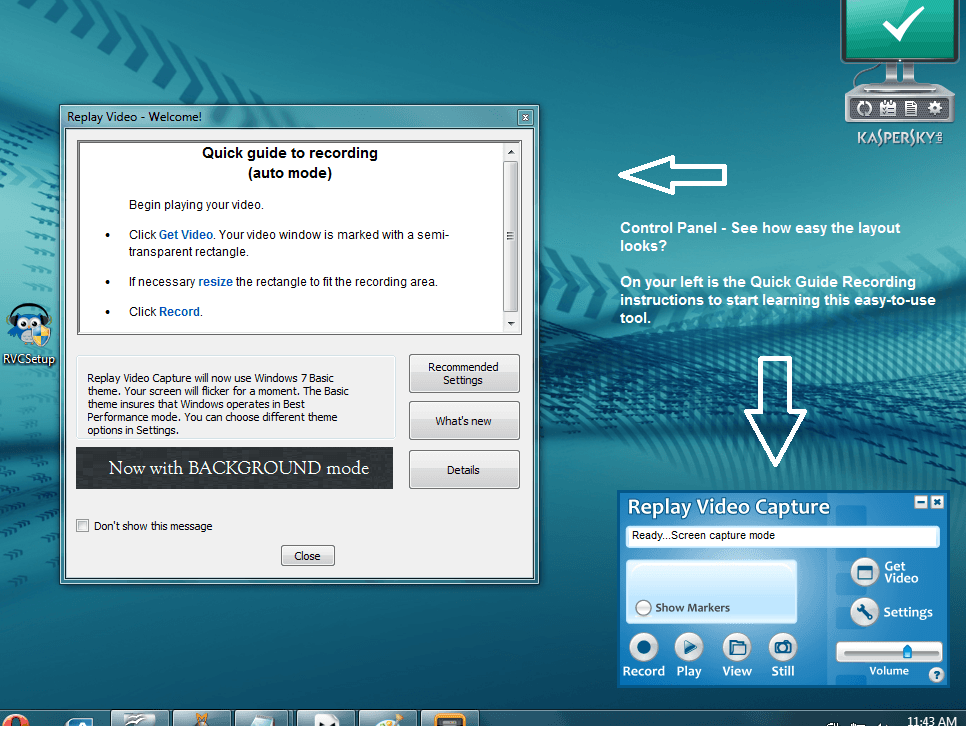
3 Steps to Record
- Click ‘Get Video’ – A semi-transparent rectangle marks the video window
- Re-size – If necessary re-size the rectangle to fit the recording area
- Record – Click record and that’s it
When the recording starts there is an option to ‘Stop’ or ‘Pause’ and resume.
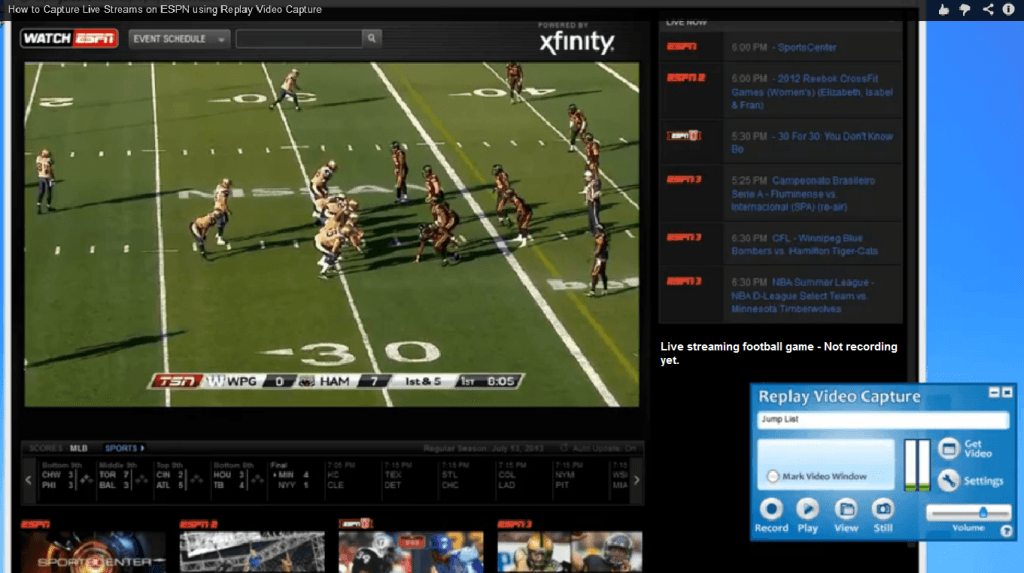
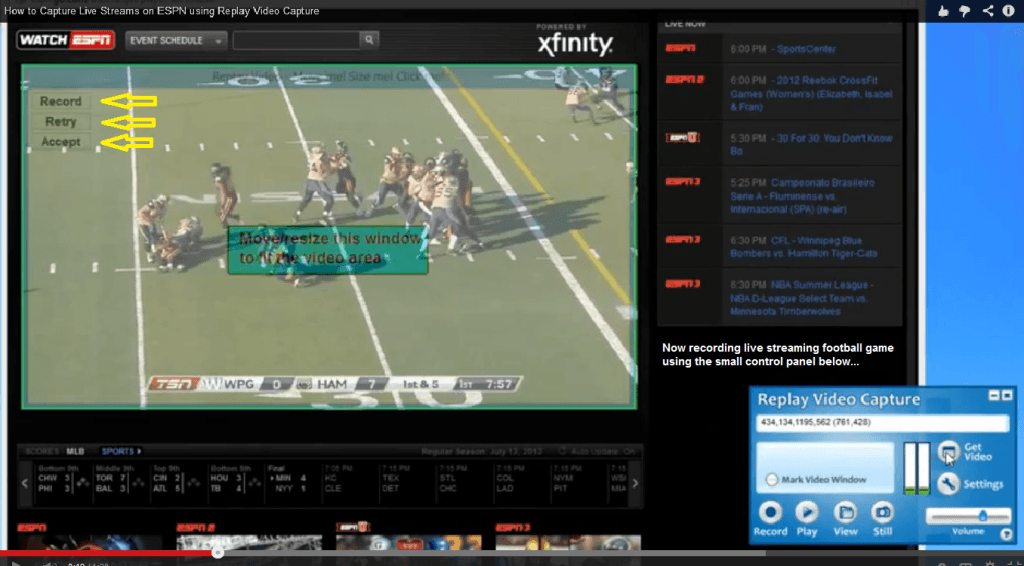
The user also has the option to choose high-quality, smaller Windows Media (WMV) or high-speed MPEG-2 files including USB/Thumb drive to save videos externally.
Applian Director
The Applian Direct is a recording tool command center that also comes with the Applian Replay Video Capture download and sits on your desktop also.
What this does is it gives you a choice to use the ‘Replay Media Center’ (additional price) that records and saves the exact digital copies of streaming videos and MP3 audio files coming from 1,000s of websites. However, this feature isn’t something you would choose if you haven’t already downloaded and installed the RMC on your computer.
There is a Video Replay Capture free download demo available. It’s fully functional to try all the features and capture 100% length of all YouTube videos but only 50% length of everything else. Making a purchase will enhance more functionality. Note: You are not required to use or purchase the Applian Director to record media with the RVC tool.
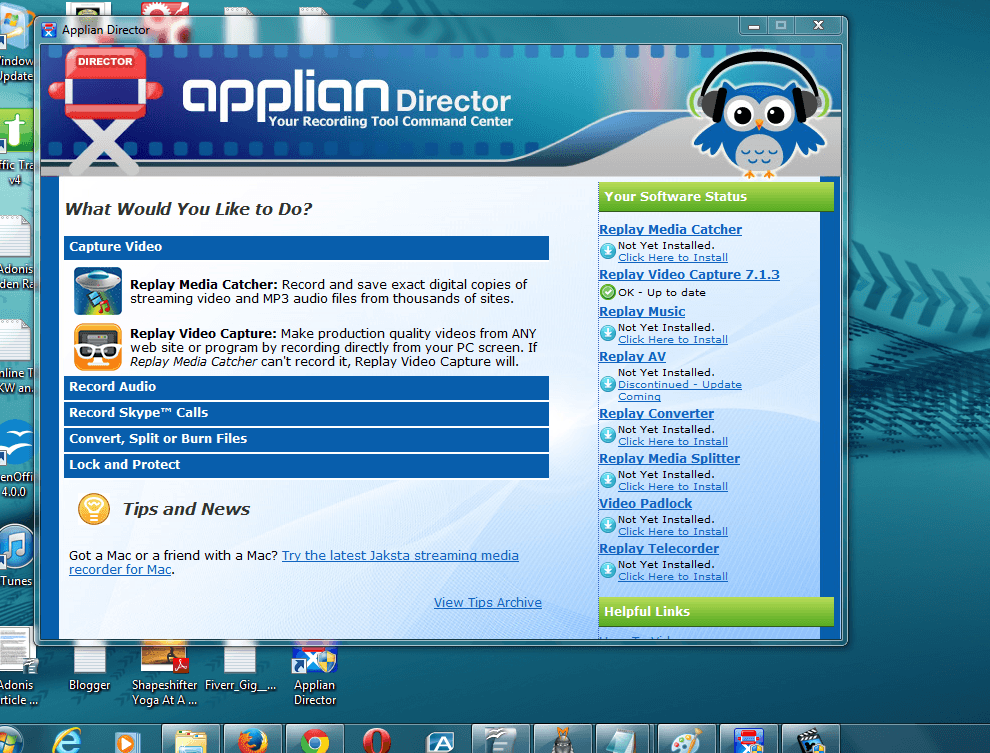
There’s also the choice to select ‘Replay Video Capture’ which is something you would choose. This feature makes production quality videos from any website or portal, media or Online TV Software player, other programs, and so on, by recording directly from a computer screen. However, if the Applian Replay Media Capture for some reason cannot record the media file, then RVC will.
Applian Replay Video Capture for Mac
The RVC Mac version has now arrived which gives Mac users the same ability to record as do Windows users. This includes the same features and service. If you have a Mac OS X 10.9 or above, then your Mac is compatible. High-speed Internet connection is required for maximum performance. The Applian Replay Video Capture Mac version lets you record any video playing on your computer whether you are online or offline — same as the Windows versions.
You also have the ability to record videos from any streaming content provider such as YouTube, Hulu, Netflix, and so on. To Find More Information on RVC Mac, Click Here to Visit the Applian Website. When you get there, just go to the “Downloads” category at the top and choose ‘Mac Downloads’.
Just like Windows users, Mac users can also use the video recording software to record Hulu, YouTube, and Amazon Prime Video. Also can record Netflix on Mac, record ESPN streaming video, and much more. Unfortunately, we did not conduct a streaming video recorder review on this Mac version. We are Windows users.
Record in HD
You can record High Definition (HD) videos with display resolutions of 1,280×720 pixels (720p) or 1,920×1,080 pixels (1080i/1080p). However, this will depend on your computer having sufficient speed and memory. In most cases, a dual-core 2.4 GHz / 4G RAM should be sufficient enough to handle 720p.
Free Trial Demo
Applian offers a Replay Video Capture free demo for both Windows and Mac computers to download and test. The software is fully functional with all the available features to check out. With this being a demo version, you only get two minutes of recording time. When that time is up the only way to record more is signing up to the paid version (one-time fee) to get unlimited video recordings.
Applian also makes it easy for Applian Replay Video Capture 7.0 users to upgrade to version 8 or any future upgrade when that time comes. There’s an incentive where the user can use their existing product activation code or email address to take advantage of a discount. Now if the user doesn’t have this information, s/he can click the ‘About’ button inside the Applian video capture software to get it or visit the official website to request the code.
However, users with a later version will have to pay a small upgrade fee (one-time) to download the software. You can get all the information when visiting the official website and going to the ‘Downloads’ page.
Replay Video Capture Review – Price and Money Back Guarantee
Replay Video Capture for Windows and Mac retails for $39.95 USD – a one-off fee for unlimited recordings that allow you to use the tool year in and year out. You have the option to pay via major credit card or an alternate payment processor (RegNow). This processor allows you to pay through PayPal which is a very secure online payment center. So if you decide to request a refund, you can go directly to your PayPal account or contact PayPal directly when using their toll-free number.
The safety-net should you decide the software isn’t for you is the 30-day money-back guarantee. Upon request, you will be refunded the full amount.
There are several audio/video products developed by Applian Technologies with different price-sets. Here are there names:
- ReplayCapture Suite
- Replay Media Catcher
- ReplayConverter
- Replay Music
- ReplayTelecorder for Skype™
- Video Padlock
- ReplayMedia Splitter
Each software and description of what it does can be found at the official website. There’s also a way to get a backup CD sent to you in the mail for an additional fee.
Pros and Cons
Pros
For the low one-time price and with everything the RVC does, you could say that it’s a no-brainer and deserves a try. I’ve used the software to record and noticed the quality of the recording is only as good as the source where the video comes from. The ease of use, interfacing and features are very good.
Without this Applian video capture tool, it leaves no way to get around recording restrictions when visiting different media websites of interest. So if you are someone who wants to record a favorite TV show, sitcom, movie, ballgame or event and watch it at a later time or start a video library, then this technology offers a quick, easy way to get beyond any restrictions to record, and thus making it a must-have replayvideo tool.
You should seriously consider using an external hard drive for storage so you don’t use up your computer’s internal hard drive storage. For over one hour recordings, file sizes can be in excess of 4 GB.
Cons
Replay Video Capture 10 isn’t compatible to Mac computers. However if you are interested, Applian Technologies created a software for the Mac (See further down). Other than that there aren’t many downsides beyond the free demo download that only allows 2 minutes of recording. That may not be enough to come up with a decision to buy, but at least this gives you the opportunity to use the software, feature enhancements and record to some extent.
Also keep in mind that just because a piece of software worked on another person’s computer, doesn’t necessarily mean it will work on yours. The same goes for any software application. That’s why it’s important to be aware of the 30-day money-back guarantee and where to go to request it if needed.
You will receive information via email on who to contact for support (payment processor) once your payment is received.
Replay Capture Suite 2022 Version
Applian Tech put together a 9 app package (Replay Capture Suite 2022) for capturing, conversion, and editing video/audio. You get the latest version to each app as follows:
- Replay Video Capture
- Replay Media Catcher
- Replay Music
- Replay Radio
- Replay Converter
- Replay Media Splitter
YTV Clone - Meeting Recorder Plus
- Video Padlock
All the apps above were updated to ensure smoother performance and minimize processing time resulting in a much faster, easier, and less CPU-draining experience. You can purchase the suite for Mac or Windows computers and the full range of suite programs are now fully compatible with the recently
released Windows 11. Click the link below to learn more and purchase…
Click Here to Get Replay Capture Suite 2022 Version
Conclusion
By the end of the day, you could have a solution that enables you to record any media. Getting past the recording restrictions while keeping in mind you won’t be violating any illegal matters. This is what Applian Technologies tells you. So if you are comfortable with this technology, be sure to read everything when visiting the official website. Send them an email with questions if any.
In fact, you can join their forum right now to ask questions or read what others are saying. After conducting my Replay Video Capture review, I found the pros outweigh the cons. I was satisfied when using the Applian video capture software to record media that was playing on my computer. You can do the same and take advantage of the free trial. That’s if you like having this tool to record at your leisure.
To Find Out More and Download – Click Here for Windows or Click Here for Mac
Video Downloader For Windows For Windows For MacAlso See Replay Capture Suite… All-in-One Video and Audio Tools Needed to Capture Media Online
Note: – Applian Replay Video Capture is included
