Too often, individuals searching for a LUX Player subscription get confused about what they’re actually buying, and that is where the issue lies that leads them to missed subscription renewals (hence: where to pay my bill), lost emails, or paying the wrong source. Be sure to read our LUX Player IPTV review article.
This article will help provide more clarification to prevent unnecessary issues from happening. Simply put, LUX Player isn’t an IPTV service provider, and doesn’t have any content or sell live channels/VOD plans by itself. Instead, it’s a media player used by the provider only to deliver its TV/VOD content to end-users. See IPTV definition.
This guide also explains how pricing works, how to correctly renew the subscription, what to expect, and how to prevent unnecessary mistakes. Lastly, you’ll know where to go to get the subscription, renew the subscription, the credentials needed, and get support to keep your service active without getting frustrated.
******************
We Are No Longer Recommending LUX Player or LUX Player IPTV Services
No longer are we recommending the subscription service for LUX Player, because of the issues some customers have experienced, such as payment issues. We recommend using a top IPTV service that provides many perks, including more channels, VODs, features, apps, device compatibility, subscription packages, prices, and excellent customer service. Click Here or, Read/Watch Full Review Here
*******************
Does LUX Player Require a Subscription?
Subscription-Based IPTV Service
The answer is ‘yes’. A subscription is needed to activate and use LUX Player to watch TV online, which comes from a 3rd-party IPTV service provider that delivers all the media content.
When the customer makes a purchase or enters into the LUX Player free trial (if available), the payment is always made on the IPTV service website– not inside the LUX media player–at least not from using the subscription-based TV/VOD provider we are. Read our article about LUX Player payment methods.
After purchasing one of the subscription plans, the IPTV service/provider sends the credentials that you use to unlock LUX with all the live TV channels and on-demand content inside. The subscription price per month plan is available on the IPTV website, and the trial plan, if available.
How the Subscription Works
- Visit the subscription-based service website
- Choose the subscription plan you want
- Enter your personal information during registration
- Submit payment
- Receive the activation/login credentials
- Enter the credentials into LUX Player to activate
- Start watching your favorites online
When completing the steps above, you also create the LUX Player account login using the email address and password created during registration.
The video below shows the subscription/trial process…
Subscription Pricing & Plans
Price Per Month, Two-Month & 3-Month
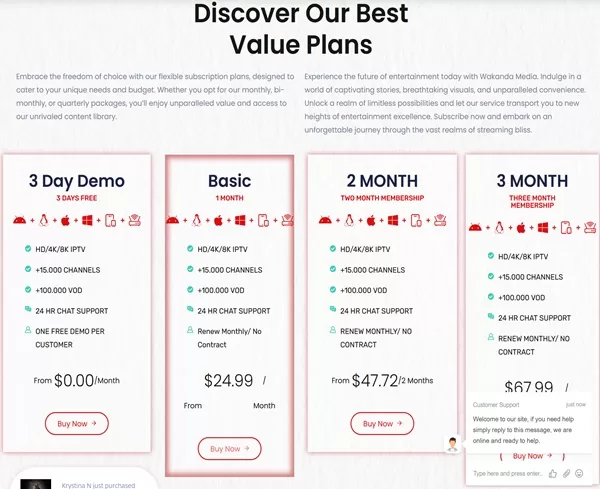
You will be referred to our IPTV service recommendation. The cost per month, 2-month, and 3-month, including the free trial, is listed below:
Subscription Prices:
- 1-Month Membership: $24.99
- 2-Month Membership: $47.72
- 3-Month Membership: $67.99
There is no LUX Player payment app with this provider, where you pay through the app when downloaded. The app is free to download. You must make a LUX Player subscription payment online via the IPTV service website.
How to Renew Your Subscription
Renewing the subscription after the time period ends requires revisiting the IPTV service provider’s website, whatever the brand name is. At this stage, you will have an account there.
Since there is no automatic billing and only a manual (one-time) payment, you have the luxury of choosing a different subscription package. Subsequently, you are never locked into one subscription plan.
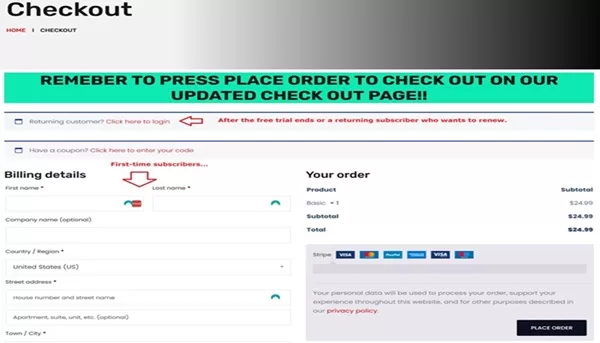
During the renewal process, you must log in to your account so that your personal information is connected with your subscription. This will enable you to keep the account login details and continue using the same TV player login details to resume watching your favorites online.
LUX Player Free Trial – What to Know
There’s a 3-Day Free Trial with no upfront credit/debit card information needed to keep on file, which means you can’t be automatically charged later. You get access to everything scot-free, which allows you to test all the streaming content delivered, features, and TV player app.
When registering, you will be creating an account and will use the same account when paying for the subscription if you elect to do so. Three days to test gives you enough time and should help you assess whether or not the app and service are right for you.
What Issues Can Occur?
After getting the paid subscription or trial, some users struggle to renew their subscription, partly due to their not being well-organized. Those users we are talking about forget the IPTV service’s brand name.
They either lose or never receive the IPTV service emails sent to them, and assume LUX Player is the billing company. And when asked, they don’t know what an IPTV service or provider is. These individuals also search online using the LUX Player as part of the search term to try to find their way back to pay the bill–this, in turn, gets them nowhere.
Usually, they find their way to other websites, like this one, that mention LUX Player, which is not related to anything they are looking for–to make their way back to the website to renew the subscription or get help. They will even contact the other websites and ask where they can pay their subscription, which one knows or can help them. This is why it’s important to be well organized.
Choosing a Compatible IPTV Service
We tell individuals they should always start by finding the IPTV service before installing a TV media player that requires a subscription. It makes no sense to install the player if there’s no IPTV service subscription. You don’t need to search to try to find one, just click the link below.
Using a top IPTV service for LUX provides reliability, expertise, experience, and great support, very good TV/VOD delivery, and performance.
Where to Pay My Bill?
If you happen to be one of the individuals who purchased a subscription somewhere and don’t have the foggiest idea where to pay the bill (hence: renew the subscription), then you might have to start over. The IPTV service generally sends out emails to the customer right after payment. Many customers don’t think to check their Spam or Junk mail folder, or didn’t provide the correct email address during registration.
These same customers get so focused on the LUX Player that they forget about the IPTV service brand name, which is very important. In most cases, when we tried to help lost customers who lost their way, it became impossible.
Why? Because those customers don’t remember the service brand name, they can’t find the emails they received, and when you ask them the name of the IPTV service, they don’t know what that is. If you find yourself in this predicament, the best thing to do is start over and find another LUX Player subscription-based service or a different IPTV service that supports a different media player.
What You Can Try to Do…
- Check your Spam or Junk mail folder for any email from the subscription-based service that may have gone there. If you happen to find any emails that came from the IPTV provider, move them into your regular email inbox
- Check the ‘Send’ section in your email account and see if you can find any emails from the service
- Check your email History to see if you can find the URL pointing to the IPTV website
Subscription Tips & Things to Watch Out For
- It’s always best to install the LUX media player before buying the subscription or entering into the free trial. Make sure the player installs correctly
- Check your Spam/Junk mail folder to make sure you received all emails from the IPTV provider. Generally, emails are sent out immediately
- Make sure to enter your correct email address during registration
- Stay organized by creating a folder in your email account to put all IPTV service emails into. Name the folder the same as the IPTV service brand name
- Bookmark the IPTV website to get back to the service
FAQs (Frequently Asked Questions)
Q: Where to Pay My Subscription?
A: If lost, find the TV service emails sent to you. Start by checking the Spam/Junk mail. Look in your Sent section via your email account and History.
Q: What is an IPTV service subscription?
A: Needed to activate and use the TV media player to watch TV online and receive support.
Q: How to Renew Service?
A: Revisit the IPTV website that has your account and pay for the subscription plan you want.
Q: Where are the Emails from the IPTV Service?
A: Check your Spam or Junk mail folder. If you find any of their emails, move them into your regular email inbox. You can also return to the IPTV website to get help.
Final Thoughts
The video tutorial above provides a better understanding of how the LUX Player subscription, trial, and renewal work. It can save you time and avoid getting confused or frustrated, especially if you’re a newcomer to these types of services. Remember, LUX is just a media player by itself; it doesn’t manage accounts, customers, or billing, and certainly doesn’t deliver any TV/VOD content on its own.
The subscription plan with pricing or free trial that you choose can only be found at the IPTV service website supporting LUX Player, which is where the registration begins. One takeaway from this guide is to keep yourself organized. You must keep track of the emails sent by the IPTV provider. We encourage you to bookmark their website to ensure you can find them later.
LUX Player is not the brand name of the IPTV service. You will know the name when you reach the recommended service. There, you can make the manual payment for the plan that interests you. Again, there is no in-app billing inside LUX.
In addition…
When knowing where to register for the subscription or free trial, what price per month or for multiple months, and staying organized, you help yourself avoid making mistakes where others have failed. Never should you be locked out of the service, not knowing where to pay or get support. You can get the player subscription, free trial, or renew the subscription easily without issues.