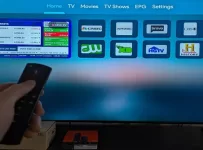
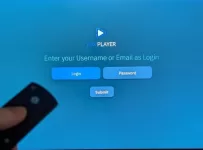
Perhaps you are considering an XPlay subscription from an ideal IPTV service with streaming quality. If so, then this guide will help break down everything there is to know about XPlay and the required subscription-based service. This includes subscription pricing, available plans, features, and how to get the free trial.
Whether it’s cutting the cost of paid TV you’re after or wanting access to the ultimate streaming and IPTV content delivery, an XPlay IPTV service could be the best solution for you. I encourage you to read further to find out the benefits, costs, and how you can get started using XPlay today!
Quick Steps to Get XPlay Subscription:
- Choose one of the XPlayer IPTV services below
- Click the button for the subscription or trial package
- Complete the registration process
- Complete the payment details
- Get your activation/login credentials
- Activate and log in to the XPlay TV player
- Start watching your favorites online
Getting an XPlay Subscription from an IPTV service offers an easy way to stream your favorite TV channels that include movies, shows, sports, and more, including VOD movies and TV series. For those who would rather test first, there’s a 3-day low-cost XPlay trial available. The app itself is a powerful solution, one that can ignite your online streaming experience when it connects to the IPTV service.
Like most other IPTV applications, XPlay does not provide any streaming content by default–it acts as a media player that requires connecting to an IPTV service. Some examples of XPlay IPTV services are Cloud Horizon and Tesla, which will be covered shortly. They supply the actual live TV channels and on-demand video content.

What is XPlay Subscription?
Downloading and installing XPlay is one part of it. The other part requires an XPlay IPTV service subscription. This comes with activation/login credentials for you to activate and use the application to watch TV over the Internet. In other words, this is where all the streaming TV/VOD content comes from.
Video: How to Get the Subscription or Trial
The video tutorial below takes you through the steps to get the XPlay subscription or XPlay Trial.
Get an XPlayer Subscription or Trial from Trusted IPTV Services
You should already know that you can’t just install XPlay and expect it to deliver all the content straight out of the box. But once it’s activated and connected to the IPTV service, the entertainment begins. I have provided two XPlayer subscription services below that you can check out and subscribe to one:
Cloud Horizon IPTV ***Includes low-cost trial
Tesla IPTV | Read Review ***Also has a low-cost trial
How to Get an XPlay Free Trial
Play by Play ***Includes Free trial
Tomorrow Land ***Also has a free trial
Both service providers offer outstanding streaming packages that deliver live channels (shows, movies, news, sports, etc.), as well as VOD movies and TV series. But there’s more under the hood as well. You simply subscribe to either IPTV service above, save the other in case you need to switch IPTVs in the future.
There’s also a low-cost trial for $3.00 that lets you test everything before paying the full subscription. Newcomers to IPTV services might want to do this first to see what is included and get familiar with things. If things are agreeable, then get the XPlay subscription.
How XPlay Works After Subscription or Trial
NOTE: It’s best to install the XPlay application before any payment to make sure it installs with no issues.
When subscribing to Tesla or Cloud Horizon:
- Expect to receive activation/login credentials immediately after registration. This includes the XPlay Provider ID, Username, Password, and Device PIN Codes
- Launch the XPlay application on the computer, smart TV, Roku, Android, iOS, or Fire TV Stick device and enter the login details. The app is not compatible with Linux computers
- Enter the activation/login credentials sent by email from Tesla or Cloud Horizon to connect to the service
- Once XPlay is activated, it unlocks the full streaming experience that enables users to watch their favorites online
What Is IP Lock?
When the app connects to either Tesla or Cloud Horizon, an IP Lock system is established. This simply means the application binds your XPlay subscription or XPlay trial that locks in your IP address. This occurs as soon as the application is activated.
- The user cannot log in to XPlay from a different location or multiple locations that have a different IP address. The subscription or trial will allow up to 5 device connections at the same time, but the user can’t take each device to a different location where there’s a different IP address and expect to watch their favorites online
- If the user’s IP address changes, meaning someone tries to connect to a different Wi-Fi network, XPlay will lock, and no service to watch TV online. The user will need to contact Tesla or Cloud Horizon, where the account is located, to do a reset
IP Lock makes it impossible for account sharing or piracy, while keeping the IPTV service secure and stable for all users. By the way, you can connect one mobile device (smartphone) to any WiFi area when traveling.
XPlay IPTV: Features and Benefits
When getting the ideal XPlay IPTV service, it delivers a pack full of streaming live channels and VODs to entertain the entire family. Activating the application to watch TV over the web comes easily and includes support when needed. You spend more time enjoying what you love to watch rather than spending time doing other things.
There are 100s of live TV channels delivered and 1000s of VOD movies/TV series. Countries and languages include the US, CA, Spanish, etc. There’s something for the entire family to watch, such as TV shows, sports, news, kids’ channels, movies, new movie releases, and so on. TV viewers can choose one, two, or three-month subscriptions depending on which XPlay IPTV service they choose.
Is XPlay Subscription Worth It?
It’s great for those who speak and understand English, even though Spanish channels and one or more other languages can be included. If saving money is high on your list, then this is one solution to look at. But it also boils down to having access to entertaining live channels and VOD content to quence ones thirst.
So if you are looking for low cost without losing what you love to watch, then the right XPlay IPTV subscription should do the trick.
Test Before You Subscribe — $3 Trial from Cloud Horizon or Tesla
As mentioned earlier, both Tesla and Cloud Horizon don’t just have an XPlay subscription; they also have 3-day XPlay trials. You can test the service with the application for only $3.00. It gives you full access to do the following:
- Test the user interface, navigation, organization of categories and sub-categories of live channels and VODs, including some of the features
- Allows exploring and playing the content without a full subscription
- Newcomers who never tried an IPTV service before get to see what all is entailed and learn as they go
If you are new, it’s recommended that you enter into the low-cost trial. If you become satisfied with everything, then you can pay for the 1-month or 3-month plan, depending on which IPTV service you choose. The XPlay subscription price for the 1-month and 3-month plans is listed below.

Subscription Price/Costs & Plans
After you test the trial (if you decide to do so) and are satisfied, you can upgrade to the XPlay subscription price per month or per 3 months. There is no automatic billing, so you will need to return to the Tesla website or Cloud website, whichever one you choose, to renew the subscription.
Tesla subscription: 1-Month @ $25.00
Cloud Horizon Subscription: 1-Month @ $25.00 and 3-Month @ $69.95
Play by Play Subscription: 1-Month @ $24.00 & 3-Month @ $68.00
Tomorrowland Subscription: 1-Month @ $22.00
How to Cancel or Change Your Xplay Subscription
Why is it so easy to cancel? Because there is no automatic billing. There’s only a manual (one-time) payment, which means you pay as you go. You have full control over when or when not to pay. If you don’t want to pay anymore, you are not obligated. If you want to pay later, you can do so with no time limit to pay. And no one is locked into any particular subscription if more than one is available.
You can choose one subscription plan to pay for. Then next time choose a different subscription plan.
Subscription Renewal
Usually, there is no automatic billing. Manual (one-time) payments are what most IPTV services have, whereas you control when you want to pay again or not. Simply return to the IPTV service website to renew the subscription. This doesn’t mean you are locked into any one subscription plan. If there are optional plans, you can choose what interests you.
If you don’t like renewing the subscription every month, then go to Cloud Horizon to register for the 3-month (quarterly) subscription. You will need to renew every 3 months. No one is locked into any one subscription from an IPTV service when it ends. You can upgrade or downgrade the XPlay subscription. But you cannot use the same activation/login credentials for both IPTV services (Cloud and Tesla).
Here’s a comparison chart for Tesla and Cloud:
| Feature / Plan | Tesla Streaming | Cloud Horizon | Play by Play | TomorrowLand |
|---|---|---|---|---|
| Trial Price | $3.00 for 3 days | $3.00 for 3 days | $0.00 for 3 days | $0.00 for 3 Days |
| 1-Month Plan | $25.00 | $25.00 | $24.00 | $22.00 |
| 3-Month Plan | $69.95 | ❌ Not Available | $68.00 | ❌ Not Available |
| 6-Month Plan | ❌ Not Available | ❌ Not Available | ❌ Not Available | ❌ Not Available |
| 12-Month Plan | ❌ Not Available | ❌ Not Available | ❌ Not Available | ❌ Not Available |
| Activation Time | Instantly after payment | Instant after payment | Instant | Instant |
| XPlay App Compatibility | ✅ Yes | ✅ Yes | ✅ Yes | ✅ Yes |
| IP Lock System | ✅ Yes (cannot change IP address) | ✅ Yes (can’t change IP address) | ✅ Yes | ✅ Yes |
| Content Offered | Live Channels (premium, US locals) w/ movies, sports, shows, etc. VOD movies & TV series | Same | Same | Same |
| Customer Support | Email & Chat | Same | Same | Same |
| Device Compatibility | Firestick, Roku, Samsung & LG Smart TVs, Android TV & Apple TV | Same | Same | Same |
| Sideloading Required for Firestick, Fire TV | ❌ No | ❌ No | ❌ No | ❌ No |
Similar Apps: NoraGo, LUX Player, SOPlayer–XPlay Has the Edge
All 4 apps listed above are compatible with mostly the same devices. However, only XPlay is compatible with Roku. It can also be found and downloaded directly from the Amazon App Store from the Fire TV Stick, Fire TV, or Fire Cube. This means sideloading XPlay is not required. Nora GO, LUX Player, and SO Player–all need to be sideloaded to those Amazon devices, which requires more steps.
All these applications require similar activation/login credentials and use an IP Lock system when connected to the IPTV service supporting the app.
Xplay Subscription FAQs
Q: What Exactly is XPlay?
A: This is a free application download that’s used to help manage, organize, and deliver streaming TV/VOD content by the IPTV service provider. XPlay by itself does not include any TV/VOD content.
Q: What is XPlayer on Roku?
A: An application/channel that can be found in the Roku channel store. Install and activate it to watch TV online via XPlayer IPTV service–see above
Q: How do I get XPlay?
A: You can find XPlay in most streaming devices’ internal app stores. You can also find the application in the Google Play Store, Apple App Store, and Amazon App Store directly. Choosing one of the XPlay IPTV services above allows you to activate/log in to XPlay to watch streaming content.
Last Words
After registering for the XPlay trial or XPlay subscription, you may come across the final page, which is your account showing your activation/login credentials. Don’t close that page until you receive the emails from the IPTV service (hence: Tesla or Cloud). Check your Spam or Junk mail if you don’t see anything. If any important emails are there, drag and drop them into your regular email inbox.